How it works
1Five clicks
An Airspy receiver listens on the airport frequency and detects a valid five-click request.
2Fresh weather
The computer reads WeatherLink Live or Ecowitt and builds a report from included voice clips.
3Radio playback
A USB relay keys a separate Yaesu radio while isolated, attenuated audio is played.
4Ready again
PTT releases, Airspy restarts, and click detection recalibrates automatically.
Lite on purpose
MyAWOS Lite provides click detection, current local weather, recorded voice, USB-relay PTT and audio playback. The full MyAWOS project remains the place for cameras, AWC products, forecasts, email reports, runway-light control, displays and other advanced integrations.
What you need
Use equipment you already own where possible. Product listings change, so match the model and specification—not merely the appearance.
| Component | Recommended source | What matters |
|---|---|---|
| Ubuntu computer | Amazon mini-PC search | x86-64, Ubuntu 24.04, four USB ports or a powered hub. |
| Airspy receiver | Official Airspy distributors | Airspy Mini or R2; receive-only click detection. |
| USB PTT relay | LCUS-1 example · Amazon search | 5 V, CH340, one channel, dry COM/NO/NC contacts. |
| USB sound adapter | Sabrent AU-MMSA | Separate class-compliant audio output. |
| Aviation radio | Yaesu FTA-250L | A compatible FTA-250L, FTA-450L or FTA-550 may be reused. |
| Yaesu adapter | SCU-42 at Aircraft Spruce | Check whether one was included with the radio. |
| Audio interface | PJ-068 plug + documented interface | Must be isolated, DC-blocked and attenuated; not a plain cable. |
| Airband antennas | Receive · Transmit | Separate receive/transmit systems covering 118–137 MHz. |
| Weather station | WeatherLink Live · Ecowitt GW1100 | Use compatible outdoor wind and temperature sensors. |
How everything connects
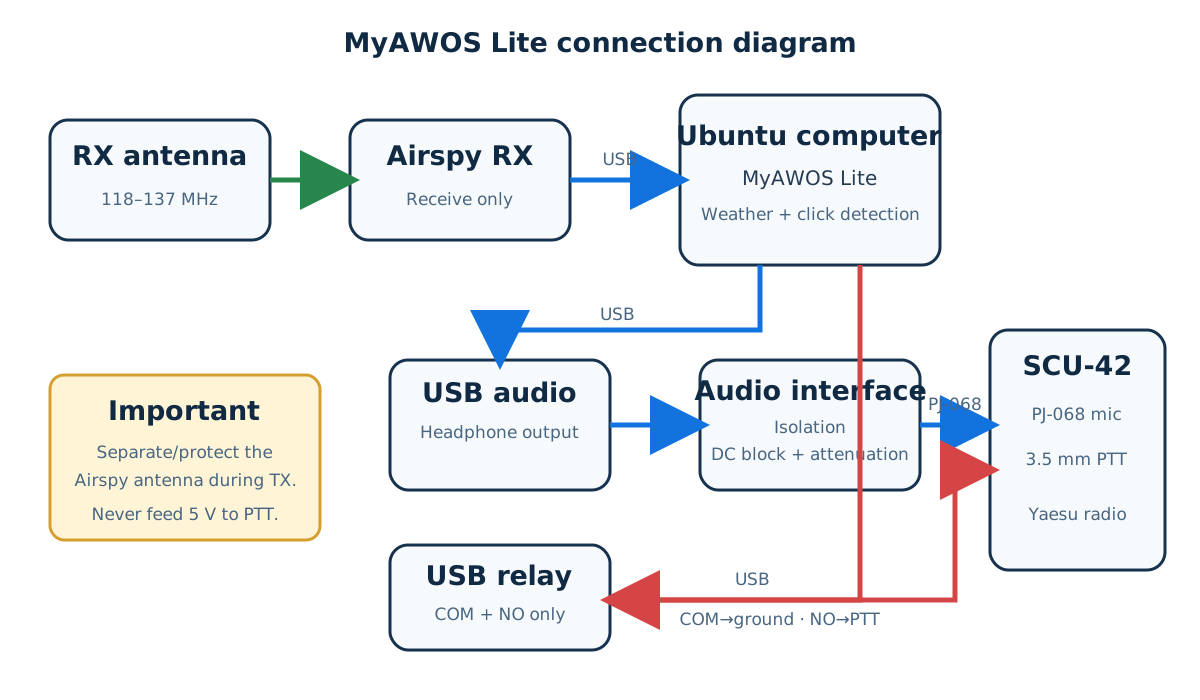
Airspy only listens. The USB relay is only a dry PTT switch. A separate Yaesu radio and isolated audio interface perform the transmission.
Install in five steps
Install Ubuntu first
Install Ubuntu 24.04 LTS, connect the Airspy, relay and USB audio adapter, and connect the computer to the internet.
Download and install
cd ~/Downloads
sudo apt install ./myawos-lite_0.1.0_all.deb
Ubuntu installs MyAWOS Lite and downloads its Airspy, audio, Python and serial dependencies.
Answer the setup wizard
sudo myawos-lite setup
Enter the station ID, authorized frequency, audio device, and WeatherLink Live or Ecowitt information. No code editing is required.
Run safe checks
sudo myawos-lite devices
sudo myawos-lite doctor
sudo myawos-lite generate
sudo myawos-lite play-audio
sudo myawos-lite relay-off
Keep the radio off or PTT disconnected. Audio-only playback never keys the transmitter.
Commission only after verification
sudo myawos-lite enable-transmit --confirm
sudo systemctl enable --now myawos-lite
First verify wiring, frequency authority, antennas, RF protection, audio quality and fail-safe PTT release.
Does one download install everything?
It installs all MyAWOS Lite software, voice clips, hardware rules and the background service. Ubuntu also downloads the required software dependencies.
You must install Ubuntu first and then complete the guided setup and physical commissioning. Software cannot safely choose your airport frequency, wire the radio, obtain weather credentials, adjust transmitted audio or approve an antenna installation. RF transmission stays disabled until you explicitly enable it.